

For the requirements that only surface once you're in it


Most of this never reaches a quote
Usually, you don't need us
The first thing we check is whether the platform already handles it — existing configuration, a feature you haven't reached yet, a workflow nobody had come across. It often does. And if it would help other organisations too, it goes to the Product Team as a roadmap candidate. Neither of those costs you anything.
When you genuinely do
If it's a real gap and you can't wait for the roadmap, we document the requirement and your implementation manager gives you a formal estimate. You decide whether it's worth it. Nothing gets built before you say so.
Only one of these four costs you anything
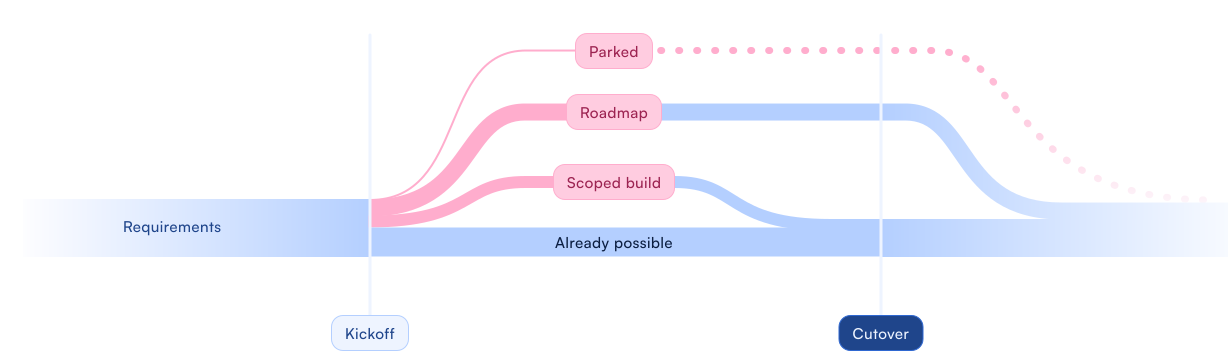
How it works
1
You tell us what you're trying to do
Not what you want built. What the requirement is, why it exists, and what happens today if it isn't met. The problem first, before anyone proposes a solution to it.
2
We check whether it already exists
Existing configuration, a feature you haven't reached yet, or a different arrangement of the same work. This step resolves more requests than the other five put together.
3
We work out who it's for
If it would benefit organisations beyond yours, it becomes a roadmap candidate and goes to the Product Team. A good part of the platform started as somebody's implementation question, and that path costs you nothing.
4
If it's genuinely specific to you, we scope it
The requirement documented, the technical implications considered, and a scope your team and our developers both read the same way. No assumptions, no verbal understandings, nothing left to interpretation.
5
You get an estimate, and you decide
Effort, timeframe and cost, from your implementation manager. Build it before cutover, schedule it for later, or leave it. All three are normal answers.
Where solutions design stops
Being clear about this upfront means you get the right specialist rather than a general answer.
What solutions design covers:
Understanding the business requirement before anything is designed
Checking whether existing functionality already solves it
Putting roadmap candidates to the Product Team on your behalf
Documented scopes your team and our developers both understand
Formal estimates before any commitment

What solutions design doesn't cover:
Training on features that already exist
Business process redesign
Building anything before you've approved a scope
Guaranteeing a roadmap item ships to a date you need
If the requirement turns out to be a training gap rather than a functionality gap, that's Enablement's job. We'll say so rather than scope something you don't need.

The teams either side of us

SwiftFox Academy
Learn the platform at your own pace. Free, forever
A video library covering every corner of the platform, plus live masterclasses run by our team. New content lands with every release. Five staff or five hundred — everyone gets in
No allowance, no licence fee, no user cap. It's yours from the day you sign.

Enablement
Hands-on training, at whatever pace suits your team
We work with your team from kickoff through cutover — demonstrating the features you're actually implementing, answering the awkward questions and getting people confident before day one.
Train the team yourself through the Academy, or bring us in.

Data services
Your history, brought across intact
We map records into SwiftFox instead of spreadsheets, with trial migrations and validation before cutover. Afterwards, dashboards, reporting environments and exports that feed your own tools.
Prepare and load the data yourself — some teams do — or hand the whole thing over.

Website development
A website that runs on the same records as your CRM
Membership applications, event registrations, directories, forms, payments, news and member portals, all driven by your CRM data. Designed and built in-house. Manage the information once.
We train you on the CMS and build the core site. Keep building pages yourself, or send them to us.